Documentation Index

Fetch the complete documentation index at: https://cometchat-22654f5b-docs-android-v6-beta2.mintlify.app/llms.txt

Use this file to discover all available pages before exploring further.

// CocoaPods
pod 'CometChatSDK', '4.1.0'

// Swift Package Manager
// https://github.com/cometchat/chat-sdk-ios.git
import CometChatSDK

let appSettings = AppSettings.AppSettingsBuilder()
  .setRegion(region: "APP_REGION")
  .subscribePresenceForAllUsers()
  .autoEstablishSocketConnection(true)
  .build()

CometChat.init(appId: "APP_ID", appSettings: appSettings, onSuccess: { _ in
  print("CometChat initialized")
}, onError: { error in
  print("Init failed: \(error.errorDescription)")
})
Prerequisites: Xcode 12+, iOS 11+, credentials from CometChat Dashboard

Prerequisites

RequirementVersion
Xcode12 or above
iOS11 or higher
Get your credentials from the CometChat Dashboard:
  • App ID
  • Region
  • Auth Key (for development)
Auth Key is for development/testing only. In production, generate Auth Tokens on your server using the REST API. Never expose Auth Keys in production client code.

Installation

CocoaPods

Create a Podfile in your project directory:
$ pod init
Add the CometChat SDK to your Podfile:
platform :ios, '11.0'
use_frameworks!

target 'MyApp' do
  pod 'CometChatSDK', '4.1.0'
end
Install the dependency:
$ pod install
To update to the latest version:
$ pod update CometChatSDK
CometChatSDK includes video calling components. We suggest you run on physical devices to avoid errors.

Swift Package Manager

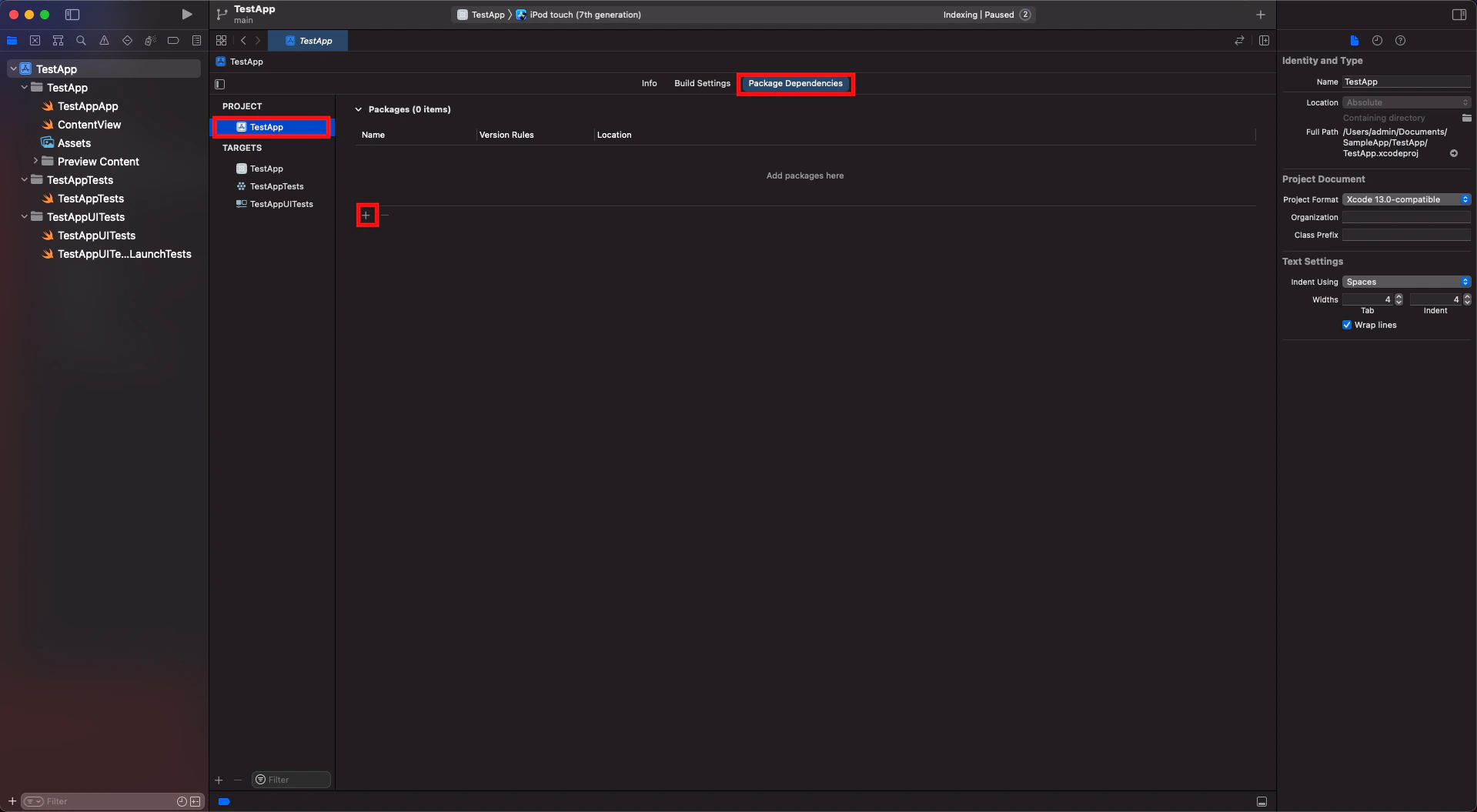
  1. Open Xcode, go to the project’s General settings tab and select the project under Project in the left column.
  2. Go to the Swift packages tab and click on the + button.
  1. Enter the repository URL https://github.com/cometchat/chat-sdk-ios.git, set dependency rule to Up to Next Major Version with version 4.1.0, and click Add Package.
  1. Ensure CometChatSDK is checked in the Package Product column and click Add Package.

Request Authorization

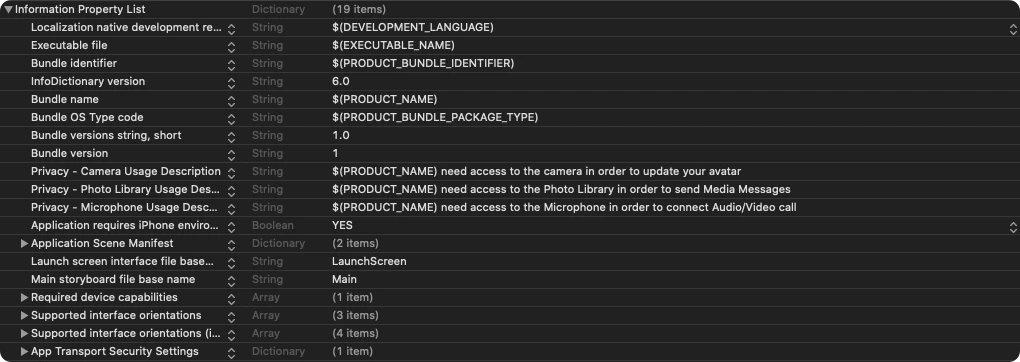
Add justification strings to your app’s Info.plist for camera, microphone, and photo library access:
<key>NSAppTransportSecurity</key>
  <dict>
    <key>NSAllowsArbitraryLoads</key>
    <true/>
  </dict>
<key>NSCameraUsageDescription</key>
  <string>$(PRODUCT_NAME) need access to the camera in order to update your avatar</string>
<key>NSPhotoLibraryUsageDescription</key>
  <string>$(PRODUCT_NAME) need access to the Photo Library in order to send Media Messages</string>
<key>NSMicrophoneUsageDescription</key>
  <string>$(PRODUCT_NAME) need access to the Microphone in order to connect Audio/Video call</string>

Setup Bitcode

Set Enable Bitcode to YES in your target’s build settings.

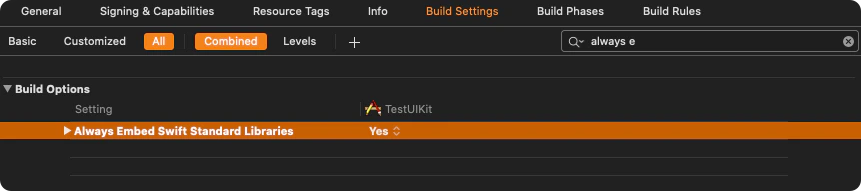
Swift Standard Libraries

Set "Always Embed Swift Standard Libraries" to Yes in your target’s build settings:

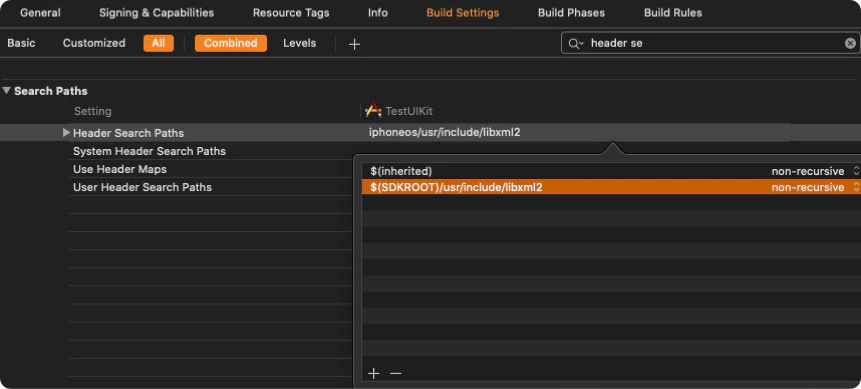
Set Header Search Path

Set Header Search Paths to $SDKROOT/usr/include/libxml2.

Initialization

The init() method initializes the SDK and must be called before any other CometChat method. Call it once at app startup, typically in didFinishLaunchingWithOptions: of your AppDelegate.
import CometChatSDK

class AppDelegate: UIResponder, UIApplicationDelegate {

  var window: UIWindow?
  let appId: String = "APP_ID"
  let region: String = "APP_REGION"

  func application(_ application: UIApplication, didFinishLaunchingWithOptions launchOptions: [UIApplication.LaunchOptionsKey: Any]?) -> Bool {

    let mySettings = AppSettings.AppSettingsBuilder()
      .subscribePresenceForAllUsers()
      .setRegion(region: region)
      .autoEstablishSocketConnection(true)
      .build()

    CometChat.init(appId: appId, appSettings: mySettings, onSuccess: { (isSuccess) in
      if (isSuccess) {
        print("CometChat SDK initialized successfully.")
      }
    }) { (error) in
      print("CometChat SDK failed to initialize with error: \(error.errorDescription)")
    }
    return true
  }
}
Replace APP_ID and APP_REGION with your credentials from the Dashboard.
CometChat.init() must be called before any other SDK method. Calling login(), sendMessage(), or registering listeners before init() will fail.

Parameters

ParameterTypeDescription
appIdStringYour CometChat App ID
appSettingsAppSettingsConfiguration object built with AppSettingsBuilder

AppSettings Options

MethodDescriptionDefault
setRegion(region:)Region where your app was created (us, eu, in)Required
subscribePresenceForAllUsers()Subscribe to presence events for all users
subscribePresenceForRoles(roles:)Subscribe to presence for specific roles
subscribePresenceForFriends()Subscribe to presence for friends only
autoEstablishSocketConnection(_:)Let SDK manage WebSocket connectionstrue
overrideAdminHost(adminHost:)Custom admin URL (dedicated deployment)
overrideClientHost(clientHost:)Custom client URL (dedicated deployment)

Presence Subscription

Choose how to subscribe to user presence (online/offline status):
// All users
AppSettings.AppSettingsBuilder()
  .subscribePresenceForAllUsers()
  .setRegion(region: region)
  .build()

// Specific roles
AppSettings.AppSettingsBuilder()
  .subscribePresenceForRoles(roles: ["admin", "moderator"])
  .setRegion(region: region)
  .build()

// Friends only
AppSettings.AppSettingsBuilder()
  .subscribePresenceForFriends()
  .setRegion(region: region)
  .build()
See User Presence for more details.

WebSocket Connection

By default, the SDK manages WebSocket connections automatically. To manage them manually:
let mySettings = AppSettings.AppSettingsBuilder()
  .setRegion(region: region)
  .autoEstablishSocketConnection(false)
  .build()
See Managing WebSocket Connections for manual control.

Next Steps

Authentication

Log in users with Auth Key or Auth Token

Send Messages

Send your first message