Documentation Index Fetch the complete documentation index at: https://cometchat-22654f5b-docs-android-v6-beta2.mintlify.app/llms.txt
Use this file to discover all available pages before exploring further.
AI Integration Quick Reference
{ "component" : "CometChatOutgoingCall" , "package" : "com.cometchat.chatuikit.calls.outgoingcall" , "xmlElement" : "<com.cometchat.chatuikit.calls.outgoingcall.CometChatOutgoingCall />" , "description" : "Full-screen outgoing call UI with recipient avatar, name, call status, and end-call button." , "primaryOutput" : { "method" : "setOnEndCallClick" , "type" : "OnClick" }, "methods" : { "data" : { "setCall" : { "type" : "Call" , "note" : "Sets the call object and extracts the receiver User automatically" }, "setUser" : { "type" : "User" , "note" : "Sets the user directly (uid, name, avatar required)" } }, "callbacks" : { "setOnEndCallClick" : "OnClick" , "setOnError" : "OnError" }, "functionality" : { "disableSoundForCall" : { "type" : "boolean" , "default" : "false" }, "setCustomSoundForCalls" : { "type" : "@RawRes int" , "default" : "SDK default" } }, "viewSlots" : { "setTitleView" : "Function2<Context, Call, View> — title text area" , "setSubtitleView" : "Function2<Context, Call, View> — subtitle text area" , "setAvatarView" : "Function2<Context, Call, View> — avatar / profile picture area" , "setEndCallView" : "Function2<Context, Call, View> — end-call button area" }, "advanced" : { "setCallSettingsBuilder" : "CometChatCalls.CallSettingsBuilder — ongoing call configuration" , "getViewModel" : "OutgoingViewModel — internal ViewModel access" }, "style" : { "setStyle" : { "type" : "@StyleRes int" , "parent" : "CometChatOutgoingCallStyle" } } }, "events" : [ { "name" : "CometChatCallEvents.ccCallAccepted" , "payload" : "Call" , "description" : "Outgoing call was accepted by the receiver" }, { "name" : "CometChatCallEvents.ccCallRejected" , "payload" : "Call" , "description" : "Outgoing call was rejected by the receiver" } ], "sdkListeners" : [ "onOutgoingCallAccepted" , "onOutgoingCallRejected" ] }
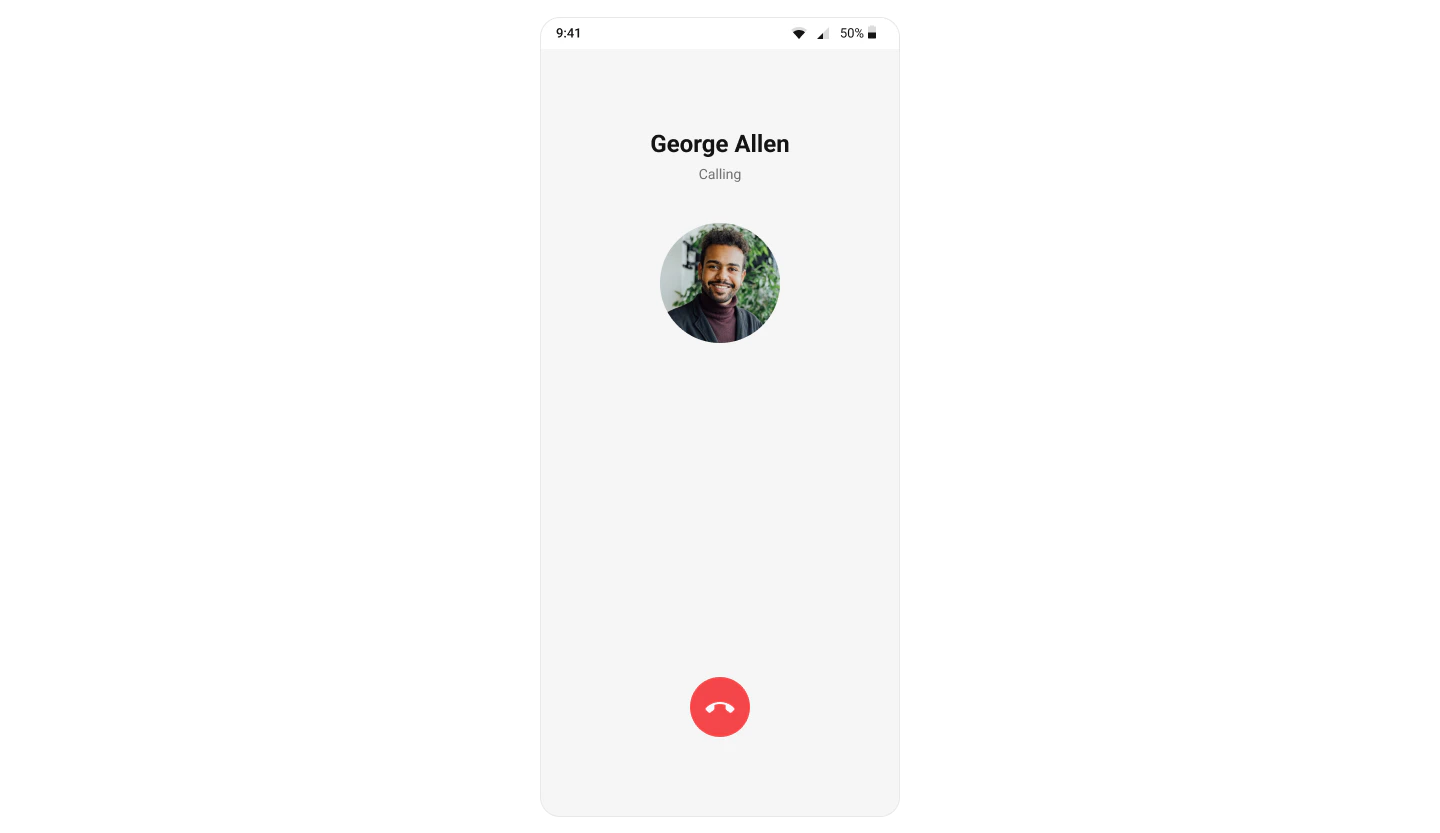
Where It Fits CometChatOutgoingCall is a call-initiation component. It renders the outgoing call screen and transitions to the ongoing call screen when the receiver accepts. Wire it to CometChatCallEvents to handle call-accepted and call-rejected transitions.class CallActivity : AppCompatActivity () { private lateinit var outgoingCall: CometChatOutgoingCall override fun onCreate (savedInstanceState: Bundle ?) { super . onCreate (savedInstanceState) setContentView (R.layout.activity_call) outgoingCall = findViewById (R.id.outgoing_call) outgoingCall. setCall (call) // pass the Call object from CometChat SDK } }
public class CallActivity extends AppCompatActivity { private CometChatOutgoingCall outgoingCall ; @ Override protected void onCreate ( Bundle savedInstanceState ) { super . onCreate (savedInstanceState); setContentView ( R . layout . activity_call ); outgoingCall = findViewById ( R . id . outgoing_call ); outgoingCall . setCall (call); // pass the Call object from CometChat SDK } }
Quick Start Add the component to your layout XML:
< com.cometchat.chatuikit.calls.outgoingcall.CometChatOutgoingCall android:id = "@+id/outgoing_call" android:layout_width = "match_parent" android:layout_height = "match_parent" />
Prerequisites: CometChat SDK initialized with CometChatUIKit.init(), a user logged in, and the cometchat-chat-uikit-android dependency added.
To add programmatically in an Activity:
private lateinit var cometchatOutgoingCall: CometChatOutgoingCall override fun onCreate (savedInstanceState: Bundle ?) { super . onCreate (savedInstanceState) cometchatOutgoingCall = CometChatOutgoingCall ( this ) cometchatOutgoingCall. setCall (call) // Required — set the Call object setContentView (cometchatOutgoingCall) }
CometChatOutgoingCall cometchatOutgoingCall ; @ Override protected void onCreate ( Bundle savedInstanceState) { super . onCreate (savedInstanceState); cometchatOutgoingCall = new CometChatOutgoingCall ( this ); cometchatOutgoingCall . setCall (call); // Required — set the Call object setContentView (cometchatOutgoingCall); }
Or in a Fragment:
private lateinit var cometchatOutgoingCall: CometChatOutgoingCall override fun onCreateView ( inflater: LayoutInflater , container: ViewGroup ?, savedInstanceState: Bundle ? ): View { cometchatOutgoingCall = CometChatOutgoingCall ( requireContext ()) cometchatOutgoingCall. setCall (call) // Required — set the Call object return cometchatOutgoingCall }
CometChatOutgoingCall cometchatOutgoingCall ; @ Override public View onCreateView (@ NonNull LayoutInflater inflater, ViewGroup container, Bundle savedInstanceState) { cometchatOutgoingCall = new CometChatOutgoingCall ( requireContext ()); cometchatOutgoingCall . setCall (call); // Required — set the Call object return cometchatOutgoingCall; }
Actions and Events Callback Methods setOnEndCallClickFires when the end-call button is tapped. Default: cancels the outgoing call via the SDK.
cometchatOutgoingCall. setOnEndCallClick ( OnClick { // Your custom end-call logic })
cometchatOutgoingCall . setOnEndCallClick ( new OnClick () { @ Override public void onClick () { // Your custom end-call logic } });
What this does: Replaces the default end-call button behavior. When the user taps the end-call button, your custom OnClick lambda executes instead of the built-in call cancellation.
setOnErrorFires on internal errors (network failure, auth issue, SDK exception).
cometchatOutgoingCall. setOnError ( object : OnError { override fun onError (context: Context , e: CometChatException ) { // Your error handling logic } })
cometchatOutgoingCall . setOnError ( new OnError () { @ Override public void onError ( CometChatException cometchatException ) { // Your error handling logic } });
What this does: Registers an error callback on the CometChatOutgoingCall instance. When an error occurs within the component, the onError method is invoked with the CometChatException containing error details.
Verify : After setting an action callback, trigger the corresponding user interaction (tap end-call, cause an error) and confirm your custom logic executes instead of the default behavior.
Global UI Events (CometChatCallEvents) CometChatCallEvents emits events subscribable from anywhere in the application. Add a listener and remove it when no longer needed.Event Fires when Payload ccCallAcceptedThe outgoing call is accepted by the receiver CallccCallRejectedThe outgoing call is rejected by the receiver Call
CometChatCallEvents. addListener ( "LISTENER_TAG" , object : CometChatCallEvents () { override fun ccCallAccepted (call: Call ) { super . ccCallAccepted (call) } override fun ccCallRejected (call: Call ) { super . ccCallRejected (call) } })
Remove Listener CometChatCallEvents.removeListener("LISTENER_TAG")
CometChatCallEvents . addListener ( "LISTENER_TAG" , new CometChatCallEvents () { @ Override public void ccCallAccepted ( Call call ) { super . ccCallAccepted (call); } @ Override public void ccCallRejected ( Call call ) { super . ccCallRejected (call); } });
Remove Listener CometChatCallEvents.removeListener("LISTENER_TAG");
SDK Events The component listens to SDK call events internally. No manual attachment needed unless additional side effects are required.
SDK Listener Internal behavior onOutgoingCallAcceptedTransitions to the ongoing call screen onOutgoingCallRejectedFinishes the activity or invokes the back-press handler
Functionality Small functional customizations for sound and call behavior.
Method Description Code disableSoundForCallEnables or disables the outgoing call ringtone .disableSoundForCall(true);setCustomSoundForCallsSets a custom sound resource for the outgoing call ringtone .setCustomSoundForCalls(R.raw.custom_ringtone);
Verify : After calling disableSoundForCall(true), initiate an outgoing call and confirm no ringtone plays.
Custom View Slots Each slot replaces a section of the default UI. All view slots accept a Function2<Context, Call, View> that receives the current context and Call object and returns a custom View.
Slot Method Replaces Title view setTitleView(Function2<Context, Call, View>)Name / title text Subtitle view setSubtitleView(Function2<Context, Call, View>)Subtitle text (e.g., “Calling…”) Avatar view setAvatarView(Function2<Context, Call, View>)Avatar / profile picture area End-call view setEndCallView(Function2<Context, Call, View>)End-call button
setTitleViewReplace the name / title text area.
cometchatOutgoingCall. setTitleView ( object : Function2 < Context ?, Call ?, View ?> { override fun apply (context: Context ?, call: Call ?): View ? { return null } })
cometchatOutgoingCall . setTitleView ((context, call) -> { return null ; });
What this does: Registers a callback that receives the Context and Call object and returns a custom View to replace the default title area on the outgoing call screen.
Example with sender and receiver names:
Create a custom_title_view.xml layout:
<? xml version = "1.0" encoding = "utf-8" ?> < LinearLayout xmlns:android = "http://schemas.android.com/apk/res/android" android:layout_width = "match_parent" android:layout_height = "wrap_content" android:gravity = "center_vertical" android:orientation = "horizontal" > < ImageView android:id = "@+id/call_iv" android:layout_width = "@dimen/cometchat_24dp" android:layout_height = "@dimen/cometchat_24dp" /> < TextView android:id = "@+id/title_text" android:layout_width = "match_parent" android:layout_height = "wrap_content" android:textAlignment = "center" android:layout_marginStart = "8dp" android:textAppearance = "?attr/cometchatTextAppearanceCaption1Regular" android:textColor = "?attr/cometchatTextColorPrimary" /> </ LinearLayout >
cometchatOutgoingCall. setTitleView ( object : Function2 < Context ?, Call ?, View ?> { override fun apply (context: Context ?, call: Call ?): View ? { val titleView: View = LayoutInflater. from (context). inflate (R.layout.custom_title_view, null ) val tvTitle = titleView. findViewById < TextView >(R.id.title_text) val user = call?.callReceiver as User tvTitle.text = user.name + " <> " + call.sender.uid return titleView } })
cometchatOutgoingCall . setTitleView ( new Function2 < Context , Call , View >() { @ Override public View apply ( Context context , Call call ) { View titleView = LayoutInflater . from (context). inflate ( R . layout . custom_title_view , null ); TextView tvTitle = titleView . findViewById ( R . id . title_text ); User user = (User) call . getCallReceiver (); tvTitle . setText ( user . getName () + " <> " + call . getSender (). getUid ()); return titleView; } });
What this does: Inflates the custom_title_view layout, retrieves the call receiver’s name and the sender’s UID, and sets the title text to display them separated by " <> ".
setSubtitleViewReplace the subtitle text below the title.
cometchatOutgoingCall. setSubtitleView ( object : Function2 < Context ?, Call ?, View ?> { override fun apply (context: Context ?, call: Call ?): View ? { return null } })
cometchatOutgoingCall . setSubtitleView ((context, call) -> { return null ; });
What this does: Registers a callback that receives the Context and Call object and returns a custom View to replace the default subtitle area on the outgoing call screen.
Example with call-type icon and “Calling…” text:
Create a custom_subtitle_view.xml layout:
<? xml version = "1.0" encoding = "utf-8" ?> < LinearLayout xmlns:android = "http://schemas.android.com/apk/res/android" android:layout_width = "match_parent" android:layout_height = "wrap_content" android:layout_gravity = "center_vertical" android:gravity = "center_horizontal" android:orientation = "horizontal" > < ImageView android:id = "@+id/call_iv" android:layout_width = "@dimen/cometchat_24dp" android:layout_height = "@dimen/cometchat_24dp" android:layout_gravity = "center_horizontal" /> < TextView android:id = "@+id/subtitle_text" android:layout_width = "wrap_content" android:layout_height = "wrap_content" android:layout_gravity = "center_horizontal" android:layout_marginStart = "8dp" android:textAlignment = "center" android:textAppearance = "?attr/cometchatTextAppearanceCaption1Regular" android:textColor = "?attr/cometchatTextColorPrimary" /> </ LinearLayout >
cometchatOutgoingCall. setSubtitleView ( object : Function2 < Context ?, Call ?, View ?> { override fun apply (context: Context ?, call: Call ?): View ? { val subtitleView: View = LayoutInflater. from (context). inflate (R.layout.custom_subtitle_view, null ) val tvTitle = subtitleView. findViewById < TextView >(R.id.subtitle_text) tvTitle.text = "Calling...." val ivCall = subtitleView. findViewById < ImageView >(R.id.call_iv) if (CometChatConstants.CALL_TYPE_AUDIO == call?.type) { ivCall. setImageResource (com.cometchat.chatuikit.R.drawable.cometchat_ic_call_voice) } else { ivCall. setImageResource (com.cometchat.chatuikit.R.drawable.cometchat_ic_call_video) } val layoutParams = LinearLayout. LayoutParams ( ViewGroup.LayoutParams.MATCH_PARENT, ViewGroup.LayoutParams.WRAP_CONTENT ) layoutParams.gravity = Gravity.CENTER_VERTICAL subtitleView.layoutParams = layoutParams return subtitleView } })
cometchatOutgoingCall . setSubtitleView ( new Function2 < Context , Call , View >() { @ Override public View apply ( Context context , Call call ) { View subtitleView = LayoutInflater . from (context). inflate ( R . layout . custom_subtitle_view , null ); TextView tvTitle = subtitleView . findViewById ( R . id . subtitle_text ); tvTitle . setText ( "Calling...." ); ImageView ivCall = subtitleView . findViewById ( R . id . call_iv ); if ( CometChatConstants . CALL_TYPE_AUDIO . equals ( call . getType ())) { ivCall . setImageResource ( com . cometchat . chatuikit . R . drawable . cometchat_ic_call_voice ); } else { ivCall . setImageResource ( com . cometchat . chatuikit . R . drawable . cometchat_ic_call_video ); } LinearLayout . LayoutParams layoutParams = new LinearLayout. LayoutParams ( ViewGroup . LayoutParams . MATCH_PARENT , ViewGroup . LayoutParams . WRAP_CONTENT ); layoutParams . gravity = Gravity . CENTER_VERTICAL ; subtitleView . setLayoutParams (layoutParams); return subtitleView; } });
What this does: Inflates the custom_subtitle_view layout, sets the subtitle text to “Calling…”, and displays a voice call icon if the call type is CALL_TYPE_AUDIO, or a video call icon otherwise.
setAvatarViewReplace the avatar / profile picture area.
cometchatOutgoingCall. setAvatarView ( object : Function2 < Context ?, Call ?, View ?> { override fun apply (context: Context ?, call: Call ?): View ? { return null } })
cometchatOutgoingCall . setAvatarView ((context, call) -> { return null ; });
What this does: Registers a callback that receives the Context and Call object and returns a custom View to replace the default avatar area on the outgoing call screen.
Example with admin badge:
Create a custom_avatar_view.xml layout:
<? xml version = "1.0" encoding = "utf-8" ?> < RelativeLayout xmlns:android = "http://schemas.android.com/apk/res/android" android:layout_width = "match_parent" android:layout_height = "wrap_content" android:layout_centerInParent = "true" android:layout_gravity = "center_horizontal" android:gravity = "center_horizontal" android:orientation = "vertical" > < com.cometchat.chatuikit.shared.views.avatar.CometChatAvatar android:id = "@+id/avatar" android:layout_width = "@dimen/cometchat_100dp" android:layout_height = "@dimen/cometchat_100dp" android:layout_marginTop = "@dimen/cometchat_40dp" /> < View android:id = "@+id/batch_view" android:layout_width = "@dimen/cometchat_100dp" android:layout_height = "@dimen/cometchat_24dp" android:layout_below = "@id/avatar" android:layout_marginTop = "-10dp" android:background = "@drawable/admin_batch" /> </ RelativeLayout >
cometchatOutgoingCall. setAvatarView ( object : Function2 < Context ?, Call ?, View ?> { override fun apply (context: Context ?, call: Call ?): View ? { val avatarView: View = LayoutInflater. from (context). inflate (R.layout.custom_avatar_view, null ) val avatar = avatarView. findViewById < CometChatAvatar >(R.id.avatar) val user = call?.receiver as User avatar. setAvatar (user.uid, user.avatar) val layoutParams = LinearLayout. LayoutParams ( ViewGroup.LayoutParams.MATCH_PARENT, ViewGroup.LayoutParams.WRAP_CONTENT ) layoutParams.gravity = Gravity.CENTER_VERTICAL avatarView.layoutParams = layoutParams return avatarView } })
cometchatOutgoingCall . setAvatarView ( new Function2 < Context , Call , View >() { @ Override public View apply ( Context context , Call call ) { View avatarView = LayoutInflater . from (context). inflate ( R . layout . custom_avatar_view , null ); CometChatAvatar avatar = avatarView . findViewById ( R . id . avatar ); User user = (User) call . getReceiver (); avatar . setAvatar ( user . getUid (), user . getAvatar ()); LinearLayout . LayoutParams layoutParams = new LinearLayout. LayoutParams ( ViewGroup . LayoutParams . MATCH_PARENT , ViewGroup . LayoutParams . WRAP_CONTENT ); layoutParams . gravity = Gravity . CENTER_VERTICAL ; avatarView . setLayoutParams (layoutParams); return avatarView; } });
What this does: Inflates the custom_avatar_view layout, retrieves the call receiver’s UID and avatar URL, sets them on the CometChatAvatar widget, and applies centered layout params.
setEndCallViewReplace the end-call button.
cometchatOutgoingCall. setEndCallView ( object : Function2 < Context ?, Call ?, View ?> { override fun apply (context: Context ?, call: Call ?): View ? { return null } })
cometchatOutgoingCall . setEndCallView ((context, call) -> { return null ; });
What this does: Registers a callback that receives the Context and Call object and returns a custom View to replace the default end-call button on the outgoing call screen.
Example with custom end-call card:
Create an end_call_button.xml layout:
<? xml version = "1.0" encoding = "utf-8" ?> < com.google.android.material.card.MaterialCardView xmlns:android = "http://schemas.android.com/apk/res/android" xmlns:app = "http://schemas.android.com/apk/res-auto" android:layout_width = "match_parent" android:layout_height = "wrap_content" android:layout_marginStart = "@dimen/cometchat_16dp" android:layout_marginEnd = "@dimen/cometchat_16dp" app:cardBackgroundColor = "?attr/cometchatErrorColor" app:cardCornerRadius = "@dimen/cometchat_16dp" app:strokeColor = "?attr/cometchatStrokeColorDark" app:strokeWidth = "1dp" > < LinearLayout android:layout_width = "match_parent" android:layout_height = "wrap_content" android:gravity = "center_horizontal" android:orientation = "horizontal" android:padding = "@dimen/cometchat_16dp" > < ImageView android:id = "@+id/end_call_iv" android:layout_width = "@dimen/cometchat_30dp" android:layout_height = "@dimen/cometchat_30dp" android:layout_gravity = "center_vertical" android:src = "@drawable/cometchat_ic_end_call" app:tint = "?attr/cometchatColorWhite" /> < TextView android:layout_width = "wrap_content" android:layout_height = "wrap_content" android:layout_gravity = "center_vertical" android:layout_marginStart = "@dimen/cometchat_16dp" android:text = "End Call" android:textAppearance = "?attr/cometchatTextAppearanceHeading4Regular" android:textColor = "?attr/cometchatColorWhite" /> </ LinearLayout > </ com.google.android.material.card.MaterialCardView >
cometchatOutgoingCall. setEndCallView ( object : Function2 < Context ?, Call ?, View ?> { override fun apply (context: Context ?, call: Call ?): View ? { val endCallButtonView: View = LayoutInflater. from (context). inflate (R.layout.end_call_button, null ) endCallButtonView. setOnClickListener { Toast. makeText (context, "End call clicked" , Toast.LENGTH_SHORT). show () } val layoutParams = LinearLayout. LayoutParams ( ViewGroup.LayoutParams.MATCH_PARENT, ViewGroup.LayoutParams.WRAP_CONTENT ) layoutParams.bottomMargin = Utils. convertDpToPx (context, 40 ) endCallButtonView.layoutParams = layoutParams return endCallButtonView } })
cometchatOutgoingCall . setEndCallView ( new Function2 < Context , Call , View >() { @ Override public View apply ( Context context , Call call ) { View endCallButtonView = LayoutInflater . from (context). inflate ( R . layout . end_call_button , null ); endCallButtonView . setOnClickListener ( new View. OnClickListener () { @ Override public void onClick ( View v) { Toast . makeText (context, "End call clicked" , Toast . LENGTH_SHORT ). show (); } }); LinearLayout . LayoutParams layoutParams = new LinearLayout. LayoutParams ( ViewGroup . LayoutParams . MATCH_PARENT , ViewGroup . LayoutParams . WRAP_CONTENT ); layoutParams . bottomMargin = Utils . convertDpToPx (context, 40 ); endCallButtonView . setLayoutParams (layoutParams); return endCallButtonView; } });
What this does: Inflates the end_call_button layout, attaches a click listener that shows a toast message “End call clicked”, sets a 40dp bottom margin, and returns the custom end-call button view.
Verify : After setting any custom view slot, confirm the custom view renders in the correct position on the outgoing call screen and that the data binding populates correctly.
Common Patterns Silent outgoing call cometchatOutgoingCall. disableSoundForCall ( true )
cometchatOutgoingCall . disableSoundForCall ( true );
Custom ringtone cometchatOutgoingCall. setCustomSoundForCalls (R.raw.custom_ringtone)
cometchatOutgoingCall . setCustomSoundForCalls ( R . raw . custom_ringtone );
Custom call settings for ongoing call val callSettingsBuilder = CometChatCalls. CallSettingsBuilder ( this , true ) . setDefaultAudioMode ( "SPEAKER" ) cometchatOutgoingCall. setCallSettingsBuilder (callSettingsBuilder)
CometChatCalls . CallSettingsBuilder callSettingsBuilder = new CometChatCalls. CallSettingsBuilder ( this , true ) . setDefaultAudioMode ( "SPEAKER" ); cometchatOutgoingCall . setCallSettingsBuilder (callSettingsBuilder);
Handle end-call with custom navigation cometchatOutgoingCall. setOnEndCallClick ( OnClick { finish () // navigate back instead of default SDK rejection })
cometchatOutgoingCall . setOnEndCallClick (() -> { finish (); // navigate back instead of default SDK rejection });
Advanced Methods setCallSets the call object and extracts the receiver User automatically. Use this when you have a Call object from the SDK.
cometChatOutgoingCall. setCall (call)
cometChatOutgoingCall . setCall (call);
setCall internally extracts the receiver from the Call object and calls setUser with it. The component then displays the receiver’s name and avatar.
setUserSets the user directly when you don’t have a Call object. The uid, name, and avatar fields are required.
cometChatOutgoingCall. setUser (user)
cometChatOutgoingCall . setUser (user);
setCallSettingsBuilderConfigures the ongoing call settings (audio mode, video settings, etc.) that apply once the call is accepted.
val callSettingsBuilder = CometChatCalls. CallSettingsBuilder ( this , true ) . setIsAudioOnly ( true ) cometChatOutgoingCall. setCallSettingsBuilder (callSettingsBuilder)
CometChatCalls . CallSettingsBuilder callSettingsBuilder = new CometChatCalls. CallSettingsBuilder ( this , true ) . setIsAudioOnly ( true ); cometChatOutgoingCall . setCallSettingsBuilder (callSettingsBuilder);
setCustomSoundForCallsSets a custom ringtone sound that plays while the outgoing call is ringing.
cometChatOutgoingCall. setCustomSoundForCalls (R.raw.custom_ringtone)
cometChatOutgoingCall . setCustomSoundForCalls ( R . raw . custom_ringtone );
disposeObserversRemoves lifecycle observers manually. Normally handled automatically when the view detaches from the window.
cometChatOutgoingCall. disposeObservers ()
cometChatOutgoingCall . disposeObservers ();
Internal Access Method Returns Description getViewModel()OutgoingViewModelThe ViewModel managing call state and SDK listeners
Use this only when the standard API is insufficient. Directly manipulating the ViewModel may conflict with the component’s internal state management.
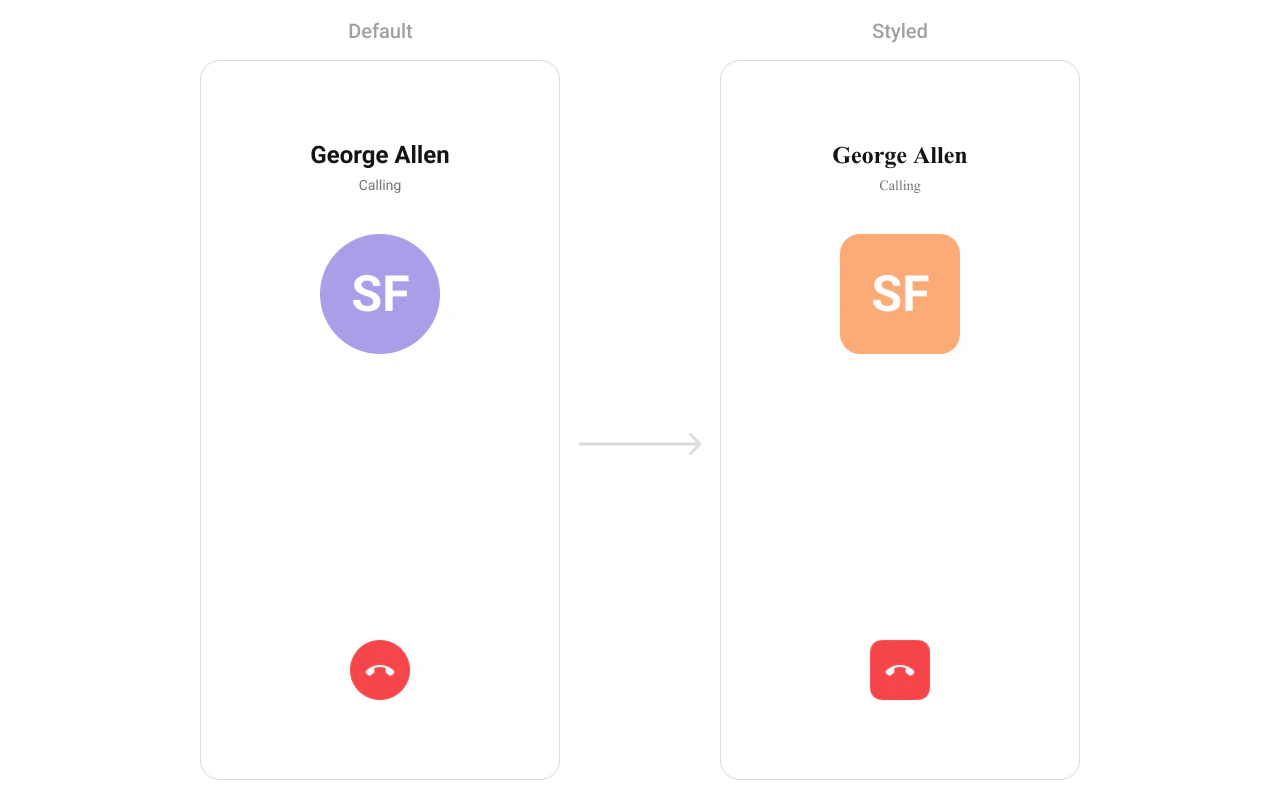
Style The component uses XML theme styles. Define a custom style with parent CometChatOutgoingCallStyle in themes.xml, then apply with setStyle().
< style name = "CustomAvatarStyle" parent = "CometChatAvatarStyle" > < item name = "cometchatAvatarStrokeRadius" > 8dp </ item > < item name = "cometchatAvatarBackgroundColor" > #FBAA75 </ item > </ style > < style name = "CustomOutgoingCall" parent = "CometChatOutgoingCallStyle" > < item name = "cometchatOutgoingCallAvatarStyle" > @style/CustomAvatarStyle </ item > </ style >
cometChatOutgoingCall. setStyle (R.style.CustomOutgoingCall)
cometChatOutgoingCall . setStyle ( R . style . CustomOutgoingCall );
To know more such attributes, visit the attributes file .
Programmatic Style Properties In addition to XML theme styles, the component exposes programmatic setters for fine-grained control:
Method Type Description setBackgroundColor@ColorInt intBackground color of the component setTitleTextColor@ColorInt intTitle text color setTitleTextAppearance@StyleRes intTitle text appearance setSubtitleTextColor@ColorInt intSubtitle text color setSubtitleTextAppearance@StyleRes intSubtitle text appearance setEndCallIconDrawableCustom end-call button icon setEndCallIconTint@ColorInt intTint color for the end-call icon setEndCallButtonBackgroundColor@ColorInt intBackground color for the end-call button setAvatarStyle@StyleRes intStyle for the avatar setCornerRadius@Dimension intCorner radius of the component setStrokeWidth@Dimension intStroke width of the component border setStrokeColor@ColorInt intStroke color of the component border
Customization Matrix What to change Where Property/API Example Set the call object Activity/Fragment setCall(Call).setCall(call)Set the user directly Activity/Fragment setUser(User).setUser(user)Override end-call behavior Activity/Fragment setOnEndCallClick(OnClick)See setOnEndCallClick code above Handle errors Activity/Fragment setOnError(OnError)See setOnError code above Disable outgoing call sound Activity/Fragment disableSoundForCall(boolean).disableSoundForCall(true);Set custom outgoing call sound Activity/Fragment setCustomSoundForCalls(@RawRes int).setCustomSoundForCalls(R.raw.custom_ringtone);Configure ongoing call settings Activity/Fragment setCallSettingsBuilder(CallSettingsBuilder).setCallSettingsBuilder(builder)Title view Activity/Fragment setTitleView(Function2)See setTitleView code above Subtitle view Activity/Fragment setSubtitleView(Function2)See setSubtitleView code above Avatar view Activity/Fragment setAvatarView(Function2)See setAvatarView code above End-call button view Activity/Fragment setEndCallView(Function2)See setEndCallView code above Avatar style (corner radius, background) themes.xmlCometChatOutgoingCallStyle with cometchatOutgoingCallAvatarStyle<item name="cometchatAvatarStrokeRadius">8dp</item>Apply a custom style Activity/Fragment setStyle(@StyleRes int)cometChatOutgoingCall.setStyle(R.style.CustomOutgoingCall);Title text color Activity/Fragment setTitleTextColor(@ColorInt int).setTitleTextColor(Color.WHITE);Subtitle text color Activity/Fragment setSubtitleTextColor(@ColorInt int).setSubtitleTextColor(Color.GRAY);End-call icon Activity/Fragment setEndCallIcon(Drawable).setEndCallIcon(drawable);End-call icon tint Activity/Fragment setEndCallIconTint(@ColorInt int).setEndCallIconTint(Color.WHITE);End-call button background Activity/Fragment setEndCallButtonBackgroundColor(@ColorInt int).setEndCallButtonBackgroundColor(Color.RED);Background color Activity/Fragment setBackgroundColor(@ColorInt int).setBackgroundColor(Color.BLACK);Corner radius Activity/Fragment setCornerRadius(@Dimension int).setCornerRadius(16);Stroke width Activity/Fragment setStrokeWidth(@Dimension int).setStrokeWidth(2);Stroke color Activity/Fragment setStrokeColor(@ColorInt int).setStrokeColor(Color.GRAY);
Next Steps
Incoming Call Incoming call notification with accept/reject
Call Buttons Voice and video call initiation buttons
Call Logs View call history
Conversations Browse recent conversations