Documentation Index Fetch the complete documentation index at: https://cometchat-22654f5b-docs-android-v6-beta2.mintlify.app/llms.txt
Use this file to discover all available pages before exploring further.
AI Integration Quick Reference
Field Value Package @cometchat/chat-uikit-react-nativeFramework React Native CLI Components CometChatConversations, CometChatMessageHeader, CometChatMessageList, CometChatMessageComposerLayout Conversation list → tap → message view Prerequisite Complete React Native CLI Integration Steps 1–4 first Pattern WhatsApp, Telegram, Signal
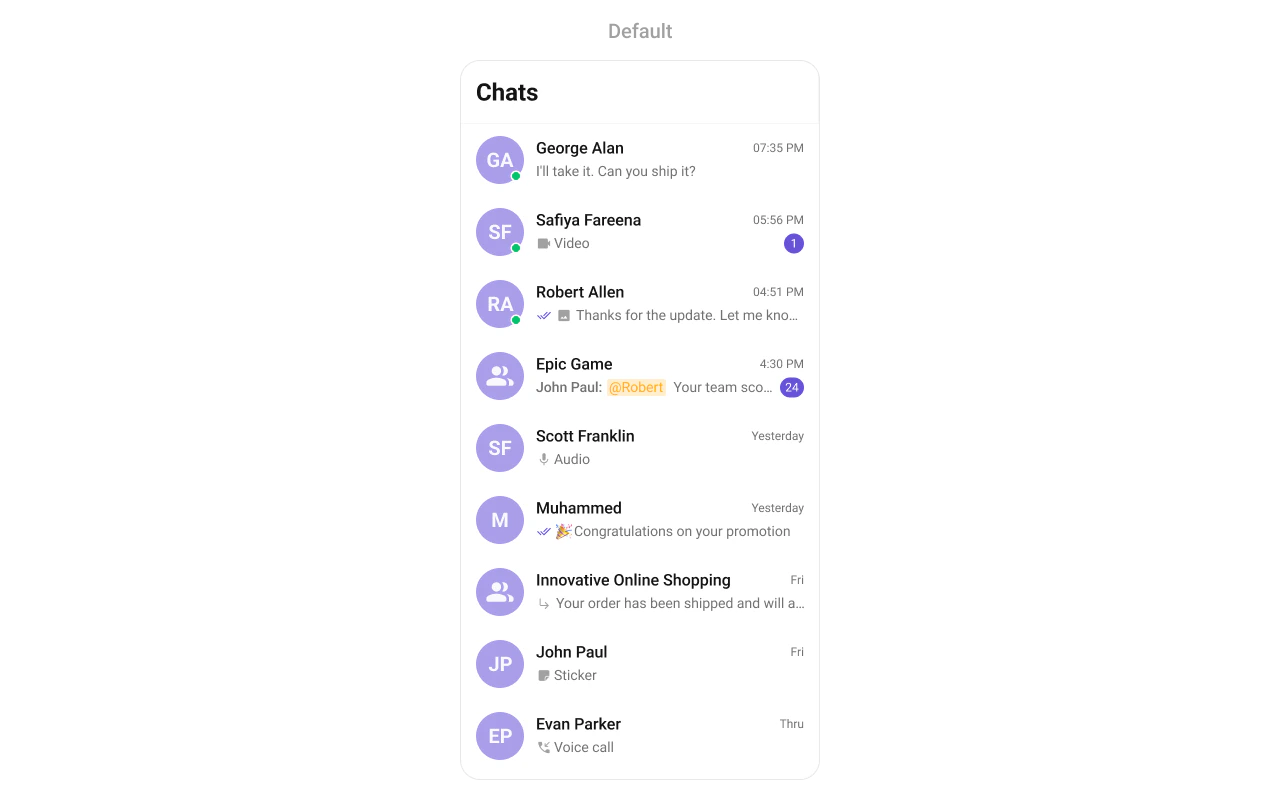
This guide builds a standard mobile chat layout — conversation list on one screen, tap to open messages. Users tap a conversation to view and send messages.
This assumes you’ve already completed React Native CLI Integration (project created, UI Kit installed, init + login working).
What You’re Building Two screens working together:
Conversation list — shows all active conversations (users and groups)Message view — displays chat messages for the selected conversation with header, message list, and composer
Step 1 — Create the Messages Component Create a Messages.tsx file that combines the message header, list, and composer:
import React from "react" ; import { View , StyleSheet } from "react-native" ; import { CometChatMessageHeader , CometChatMessageList , CometChatMessageComposer , } from "@cometchat/chat-uikit-react-native" ; import { CometChat } from "@cometchat/chat-sdk-react-native" ; interface MessagesProps { user ?: CometChat . User ; group ?: CometChat . Group ; onBack : () => void ; } const Messages = ({ user , group , onBack } : MessagesProps ) => { return ( < View style = { styles . container } > < CometChatMessageHeader user = { user } group = { group } onBack = { onBack } showBackButton /> < CometChatMessageList user = { user } group = { group } /> < CometChatMessageComposer user = { user } group = { group } /> </ View > ); }; const styles = StyleSheet . create ({ container: { flex: 1 , }, }); export default Messages ;
import React from "react" ; import { View , StyleSheet } from "react-native" ; import { CometChatMessageHeader , CometChatMessageList , CometChatMessageComposer , } from "@cometchat/chat-uikit-react-native" ; const Messages = ({ user , group , onBack }) => { return ( < View style = { styles . container } > < CometChatMessageHeader user = { user } group = { group } onBack = { onBack } showBackButton /> < CometChatMessageList user = { user } group = { group } /> < CometChatMessageComposer user = { user } group = { group } /> </ View > ); }; const styles = StyleSheet . create ({ container: { flex: 1 , }, }); export default Messages ;
Key points:
CometChatMessageHeader shows the recipient’s name, avatar, and back buttonCometChatMessageList displays the chat history with real-time updatesCometChatMessageComposer provides the text input with media, emojis, and send buttonPass either user or group to the components, never both
Step 2 — Update App.tsx Wire the conversation list and message components together:
import React , { useEffect , useState } from "react" ; import { ViewStyle } from "react-native" ; import { SafeAreaProvider , SafeAreaView } from "react-native-safe-area-context" ; import { GestureHandlerRootView } from "react-native-gesture-handler" ; import { CometChatConversations , CometChatUIKit , CometChatUiKitConstants , UIKitSettings , CometChatThemeProvider , CometChatI18nProvider , } from "@cometchat/chat-uikit-react-native" ; import { CometChat } from "@cometchat/chat-sdk-react-native" ; import Messages from "./Messages" ; const APP_ID = "APP_ID" ; const AUTH_KEY = "AUTH_KEY" ; const REGION = "REGION" ; const UID = "cometchat-uid-1" ; const App = () : React . ReactElement => { const [ loggedIn , setLoggedIn ] = useState ( false ); const [ messageUser , setMessageUser ] = useState < CometChat . User >(); const [ messageGroup , setMessageGroup ] = useState < CometChat . Group >(); useEffect (() => { const init = async () => { const uiKitSettings : UIKitSettings = { appId: APP_ID , authKey: AUTH_KEY , region: REGION , subscriptionType: CometChat . AppSettings . SUBSCRIPTION_TYPE_ALL_USERS as UIKitSettings [ "subscriptionType" ], }; try { await CometChatUIKit . init ( uiKitSettings ); await CometChatUIKit . login ({ uid: UID }); setLoggedIn ( true ); } catch ( err ) { console . error ( "Init/login error:" , err ); } }; init (); }, []); const handleConversationPress = ( conversation : CometChat . Conversation ) => { const conversationType = conversation . getConversationType (); if ( conversationType === CometChatUiKitConstants . ConversationTypeConstants . user ) { setMessageUser ( conversation . getConversationWith () as CometChat . User ); setMessageGroup ( undefined ); } else { setMessageUser ( undefined ); setMessageGroup ( conversation . getConversationWith () as CometChat . Group ); } }; const handleBack = () => { setMessageUser ( undefined ); setMessageGroup ( undefined ); }; return ( < GestureHandlerRootView style = { { flex: 1 } } > < SafeAreaProvider > < CometChatI18nProvider > < SafeAreaView style = { styles . fullScreen } > < CometChatThemeProvider > { loggedIn && ( <> { /* Conversation list (hidden when chat is open) */ } < CometChatConversations style = { { containerStyle: { display: messageUser || messageGroup ? "none" : "flex" , }, } } onItemPress = { handleConversationPress } /> { /* Message view */ } { ( messageUser || messageGroup ) && ( < Messages user = { messageUser } group = { messageGroup } onBack = { handleBack } /> ) } </> ) } </ CometChatThemeProvider > </ SafeAreaView > </ CometChatI18nProvider > </ SafeAreaProvider > </ GestureHandlerRootView > ); }; const styles : { fullScreen : ViewStyle } = { fullScreen: { flex: 1 }, }; export default App ;
import React , { useEffect , useState } from "react" ; import { SafeAreaProvider , SafeAreaView } from "react-native-safe-area-context" ; import { GestureHandlerRootView } from "react-native-gesture-handler" ; import { CometChatConversations , CometChatUIKit , CometChatUiKitConstants , CometChatThemeProvider , CometChatI18nProvider , } from "@cometchat/chat-uikit-react-native" ; import { CometChat } from "@cometchat/chat-sdk-react-native" ; import Messages from "./Messages" ; const APP_ID = "APP_ID" ; const AUTH_KEY = "AUTH_KEY" ; const REGION = "REGION" ; const UID = "cometchat-uid-1" ; const App = () => { const [ loggedIn , setLoggedIn ] = useState ( false ); const [ messageUser , setMessageUser ] = useState (); const [ messageGroup , setMessageGroup ] = useState (); useEffect (() => { const init = async () => { const uiKitSettings = { appId: APP_ID , authKey: AUTH_KEY , region: REGION , subscriptionType: CometChat . AppSettings . SUBSCRIPTION_TYPE_ALL_USERS , }; try { await CometChatUIKit . init ( uiKitSettings ); await CometChatUIKit . login ({ uid: UID }); setLoggedIn ( true ); } catch ( err ) { console . error ( "Init/login error:" , err ); } }; init (); }, []); const handleConversationPress = ( conversation ) => { const conversationType = conversation . getConversationType (); if ( conversationType === CometChatUiKitConstants . ConversationTypeConstants . user ) { setMessageUser ( conversation . getConversationWith ()); setMessageGroup ( undefined ); } else { setMessageUser ( undefined ); setMessageGroup ( conversation . getConversationWith ()); } }; const handleBack = () => { setMessageUser ( undefined ); setMessageGroup ( undefined ); }; return ( < GestureHandlerRootView style = { { flex: 1 } } > < SafeAreaProvider > < CometChatI18nProvider > < SafeAreaView style = { { flex: 1 } } > < CometChatThemeProvider > { loggedIn && ( <> { /* Conversation list (hidden when chat is open) */ } < CometChatConversations style = { { containerStyle: { display: messageUser || messageGroup ? "none" : "flex" , }, } } onItemPress = { handleConversationPress } /> { /* Message view */ } { ( messageUser || messageGroup ) && ( < Messages user = { messageUser } group = { messageGroup } onBack = { handleBack } /> ) } </> ) } </ CometChatThemeProvider > </ SafeAreaView > </ CometChatI18nProvider > </ SafeAreaProvider > </ GestureHandlerRootView > ); }; export default App ;
How it works:
CometChatConversations renders the list of conversationsonItemPress fires when a user taps a conversation, extracting the User or GroupmessageUser / messageGroup state drives which chat is displayedThe conversation list is hidden (via display: "none") when a chat is open
handleBack clears the selection and returns to the conversation list
Step 3 — Run the Project npx react-native run-android
You should see the conversation list. Tap any conversation to open the message view. Use the back button to return to the list.
Next Steps
Theming Customize colors, fonts, and styles to match your brand
Components Overview Browse all prebuilt UI components
React Native CLI Integration Back to the main setup guide
Core Features Chat features included out of the box