Documentation Index
Fetch the complete documentation index at: https://cometchat-22654f5b-docs-android-v6-beta2.mintlify.app/llms.txt
Use this file to discover all available pages before exploring further.
AI Integration Quick Reference
{
  "component": "CometChatThreadHeader",
  "package": "@cometchat/chat-uikit-react-native",
  "import": "import { CometChatThreadHeader } from \"@cometchat/chat-uikit-react-native\";",
  "description": "Displays the parent message and number of replies in a thread.",
  "props": {
    "data": {
      "parentMessage": {
        "type": "CometChat.BaseMessage",
        "note": "The parent message for which replies are shown"
      },
      "template": {
        "type": "CometChatMessageTemplate",
        "note": "Custom template for the parent message bubble"
      }
    },
    "visibility": {
      "replyCountVisibility": { "type": "boolean", "default": true },
      "replyCountBarVisibility": { "type": "boolean", "default": true },
      "receiptsVisibility": { "type": "boolean", "default": true },
      "avatarVisibility": { "type": "boolean", "default": true }
    },
    "formatting": {
      "alignment": { "type": "MessageBubbleAlignmentType", "default": "left" },
      "datePattern": "(message: CometChat.BaseMessage) => string",
      "textFormatters": "Array<CometChatTextFormatter>"
    }
  }
}
Where It Fits
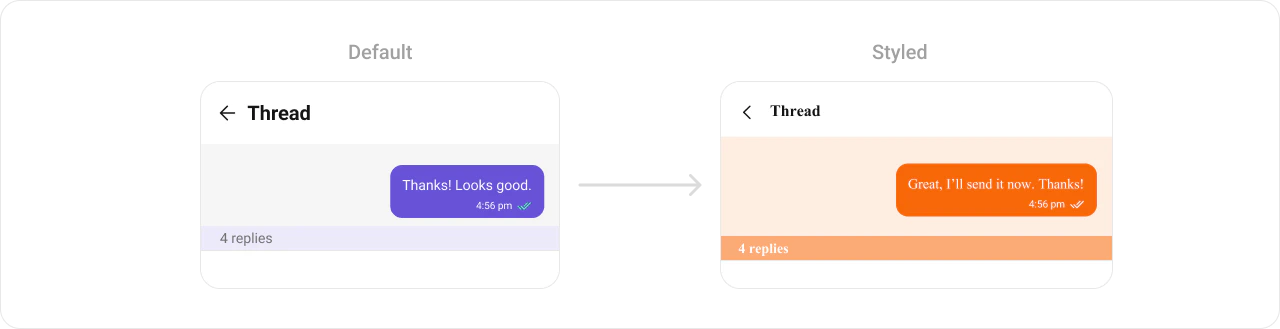
CometChatThreadHeader is a Component that displays the parent message and number of replies in a thread.
Minimal Render
import {
  CometChatMessageList,
  CometChatThreadHeader,
} from "@cometchat/chat-uikit-react-native";
import { CometChat } from "@cometchat/chat-sdk-react-native";
import { useState } from "react";

function ThreadHeaderDemo() {
  const [parentMessage, setParentMessage] = useState<CometChat.BaseMessage | null>(null);

  return (
    <>
      {!parentMessage && (
        <CometChatMessageList
          group={group}
          onThreadRepliesPress={(message: CometChat.BaseMessage) => {
            setParentMessage(message);
          }}
        />
      )}
      {parentMessage && <CometChatThreadHeader parentMessage={parentMessage} />}
    </>
  );
}
Styling
Using Style you can customize the look and feel of the component in your app. Pass a styling object as a prop to the CometChatThreadHeader component.
import { CometChatThreadHeader } from "@cometchat/chat-uikit-react-native";

function StylingDemo() {
  return (
    <CometChatThreadHeader
      parentMessage={parentMessage}
      style={{
        containerStyle: {
          backgroundColor: "#FEEDE1",
        },
        messageBubbleContainerStyle: {
          backgroundColor: "#FEEDE1",
        },
        replyCountBarStyle: {
          backgroundColor: "#FBA46B",
        },
        replyCountTextStyle: {
          color: "#FFFFFF",
        },
        outgoingMessageBubbleStyles: {
          containerStyle: {
            backgroundColor: "#F76808",
          },
        },
      }}
    />
  );
}
Visibility Props
| Property | Description | Code |
|---|
replyCountVisibility | Toggle reply count visibility | replyCountVisibility?: boolean |
replyCountBarVisibility | Toggle reply count bar visibility | replyCountBarVisibility?: boolean |
receiptsVisibility | Toggle receipts visibility | receiptsVisibility?: boolean |
avatarVisibility | Toggle avatar visibility | avatarVisibility?: boolean |
alignment | Alignment type for the parent message bubble | alignment?: MessageBubbleAlignmentType |
Custom Template
The template property is used to configure and set a custom template for parent message bubble.
import { CometChat } from "@cometchat/chat-sdk-react-native";
import {
  CometChatThreadHeader,
  CometChatMessageTemplate,
  ChatConfigurator,
  MessageBubbleAlignmentType,
  useTheme,
} from "@cometchat/chat-uikit-react-native";
import { Text } from "react-native";

function CustomTemplateDemo() {
  const theme = useTheme();

  const getTemplate = () => {
    let templates: CometChatMessageTemplate[] =
      ChatConfigurator.getDataSource().getAllMessageTemplates(theme);
    const textTemplate = templates.find((template) => {
      if (template.type == "text") {
        template.ContentView = (
          messageObject: CometChat.BaseMessage,
          alignment: MessageBubbleAlignmentType
        ) => {
          const textMessage = messageObject as CometChat.TextMessage;
          return (
            <Text style={{ backgroundColor: "#fff5fd", padding: 10 }}>
              {textMessage.getText()}
            </Text>
          );
        };
        return template;
      }
    });
    return textTemplate;
  };

  return (
    <CometChatThreadHeader
      parentMessage={parentMessage}
      template={getTemplate()}
    />
  );
}
Next Steps
Threaded Messages
Display the complete threaded conversation view
Message List
Display the list of messages in a conversation
Message Template
Customize message bubble templates
Component Styling
Customize the appearance of UI Kit components