Documentation Index Fetch the complete documentation index at: https://cometchat-22654f5b-docs-android-v6-beta2.mintlify.app/llms.txt
Use this file to discover all available pages before exploring further.
AI Integration Quick Reference
Field Value Package @cometchat/chat-uikit-reactFramework Next.js Components CometChatMessageHeader, CometChatMessageList, CometChatMessageComposerLayout Single chat window — no sidebar, no conversation list Prerequisite Complete Next.js Integration Steps 1–5 first SSR Dynamic import with ssr: false — CometChat requires browser APIs Pattern Support chat, embedded widgets, focused messaging
This guide builds a single chat window — no sidebar, no conversation list. Users go directly into a one-to-one or group chat. Good for support chat, embedded widgets, or any focused messaging experience.
This assumes you’ve already completed Next.js Integration (project created, UI Kit installed, CSS imported).
Fork the sandbox, insert your CometChat credentials (App ID, Region, Auth Key), and preview the UI in real time.
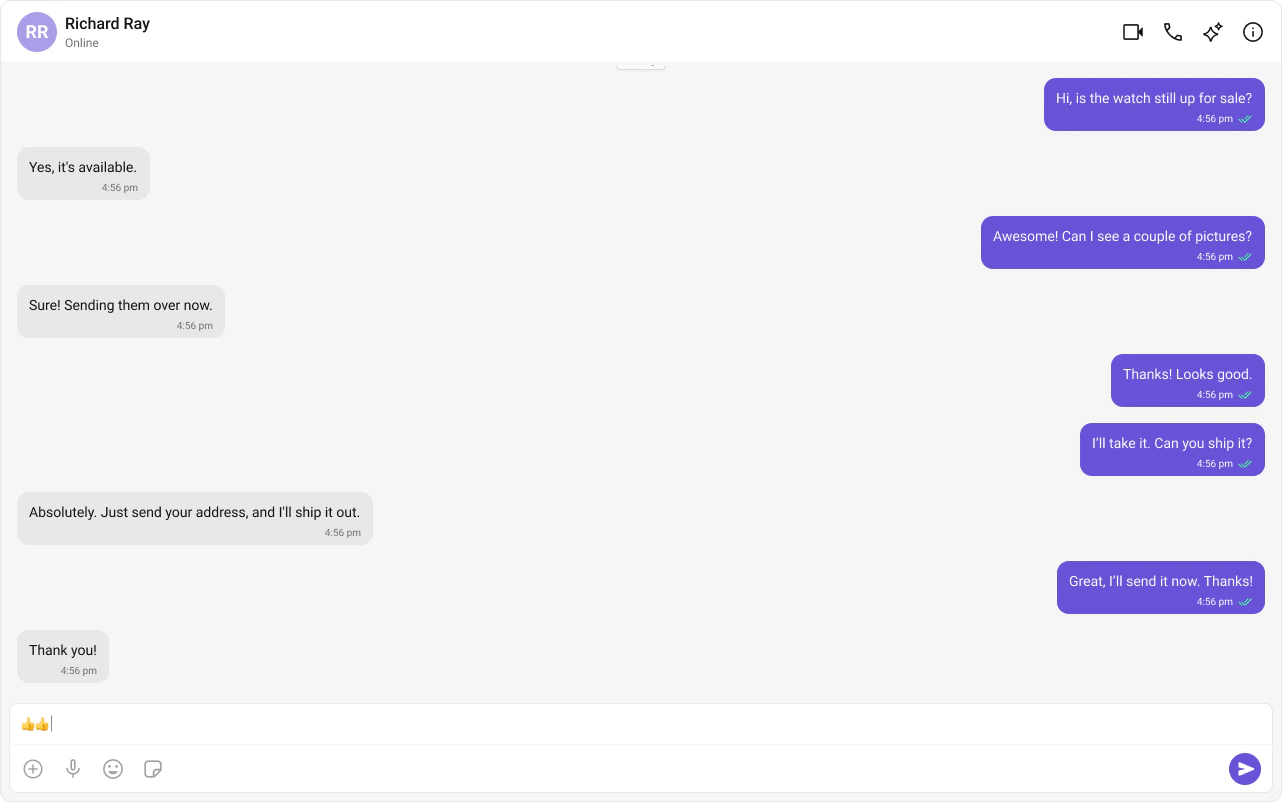
What You’re Building Three components stacked vertically:
Chat header — displays recipient name, avatar, online status, and optional call buttonsMessage list — real-time chat history with scrollingMessage composer — text input with media, emojis, and reactions
Step 1 — Create the CometChatNoSSR Component This component handles init, login, fetches the target user/group, and renders the chat UI. It runs client-side only.
import React , { useEffect , useState } from "react" ; import { CometChatMessageComposer , CometChatMessageHeader , CometChatMessageList , CometChatUIKit , UIKitSettingsBuilder , } from "@cometchat/chat-uikit-react" ; import { CometChat } from "@cometchat/chat-sdk-javascript" ; import "./CometChatNoSSR.css" ; const COMETCHAT_CONSTANTS = { APP_ID: "" , // Replace with your App ID REGION: "" , // Replace with your Region AUTH_KEY: "" , // Replace with your Auth Key (dev only) }; // Fetch the user whose chat you want to load const UID = "cometchat-uid-1" ; const CometChatNoSSR : React . FC = () => { const [ user , setUser ] = useState < CometChat . User | undefined >( undefined ); const [ selectedUser , setSelectedUser ] = useState < CometChat . User | undefined >( undefined ); const [ selectedGroup , setSelectedGroup ] = useState < CometChat . Group | undefined >( undefined ); useEffect (() => { const UIKitSettings = new UIKitSettingsBuilder () . setAppId ( COMETCHAT_CONSTANTS . APP_ID ) . setRegion ( COMETCHAT_CONSTANTS . REGION ) . setAuthKey ( COMETCHAT_CONSTANTS . AUTH_KEY ) . subscribePresenceForAllUsers () . build (); CometChatUIKit . init ( UIKitSettings ) ?. then (() => { console . log ( "Initialization completed successfully" ); CometChatUIKit . getLoggedinUser (). then (( loggedInUser ) => { if ( ! loggedInUser ) { CometChatUIKit . login ( "cometchat-uid-2" ) . then (( user ) => { console . log ( "Login Successful" , { user }); setUser ( user ); }) . catch (( error ) => console . error ( "Login failed" , error )); } else { console . log ( "Already logged-in" , { loggedInUser }); setUser ( loggedInUser ); } }); }) . catch (( error ) => console . error ( "Initialization failed" , error )); }, []); useEffect (() => { if ( user ) { CometChat . getUser ( UID ). then ( ( user ) => setSelectedUser ( user ), ( error ) => console . log ( "User fetching failed with error:" , error ) ); // To load a group chat instead, uncomment below: // const GUID = "GUID"; // CometChat.getGroup(GUID).then( // (group) => setSelectedGroup(group), // (error) => console.log("Group fetching failed with error:", error) // ); } }, [ user ]); return user ? ( <> { selectedUser || selectedGroup ? ( < div className = "messages-wrapper" > < CometChatMessageHeader user = { selectedUser } group = { selectedGroup } /> < CometChatMessageList user = { selectedUser } group = { selectedGroup } /> < CometChatMessageComposer user = { selectedUser } group = { selectedGroup } /> </ div > ) : ( < div className = "empty-conversation" > Set a user or group UID in CometChatNoSSR.tsx to start chatting </ div > ) } </> ) : undefined ; }; export default CometChatNoSSR ; .messages-wrapper { width : 100 % ; height : 100 % ; display : flex ; flex-direction : column ; } .empty-conversation { height : 100 % ; width : 100 % ; display : flex ; justify-content : center ; align-items : center ; background : white ; color : var ( --cometchat-text-color-secondary , #727272 ); font : var ( --cometchat-font-body-regular , 400 14 px Roboto); } .cometchat .cometchat-message-composer { border-radius : 0 px ; }
Key points:
CometChat.getUser(UID) fetches the user object from the SDK — you need a real user object, not a manually constructed one.Pass either user or group to the message components, never both.
The highlighted lines show where to set your credentials.
Switching Between User and Group Chat To load a group chat instead of one-to-one, replace the getUser call with getGroup:
const GUID = "GUID" ; // Replace with your actual Group ID CometChat . getGroup ( GUID ) . then (( group ) => setSelectedGroup ( group )) . catch (( error ) => console . error ( "Failed to fetch group:" , error )); Step 2 — Disable SSR in Your Page Dynamically import CometChatNoSSR with ssr: false so it only loads client-side.
import dynamic from "next/dynamic" ; import "@cometchat/chat-uikit-react/css-variables.css" ; const CometChatComponent = dynamic ( () => import ( "../CometChatNoSSR/CometChatNoSSR" ), { ssr: false } ); export default function Home () { return < CometChatComponent /> ; }
Step 3 — Run the Project You should see the chat window load with the conversation for the UID you set.
Next Steps
Theming Customize colors, fonts, and styles to match your brand
Components Overview Browse all prebuilt UI components
Next.js Integration Back to the main setup guide
Core Features Chat features included out of the box