

Documentation Index
Fetch the complete documentation index at: https://cometchat-22654f5b-docs-android-v6-beta2.mintlify.app/llms.txt
Use this file to discover all available pages before exploring further.
AI Integration Quick Reference
AI Integration Quick Reference
- Purpose: Keep real-time connection alive when app enters background
- Enable: Add Background Modes capability → Enable “Background fetch” and “Remote notifications”
- Behavior: Maintains connection for a few seconds in background
- Use case: Update UI with new messages when switching between apps
- Related: Connection Status · WebSocket Connection
Background updates behaviour
This below table is applicable only when these steps are followed. autoEstablishSocketConnection usage can be found in Managing Web-Socket connections manually.| Value | Behaviour | |
|---|---|---|
| autoEstablishSocketConnection | true | Connection is maintained in background for 30 seconds and after that it is killed. |
| autoEstablishSocketConnection | false | 1. If CometChat.connect() is called and app goes to background the connection is maintained for 30 seconds and after that connection is terminated. 2. If CometChat.disconnect() is called and app goes to background the connection not maintained. |
Step 1. Add Background Modes in Capabilities
Click on Targets -> Project -> [+ Capability] -> Add ‘Background Modes’ section.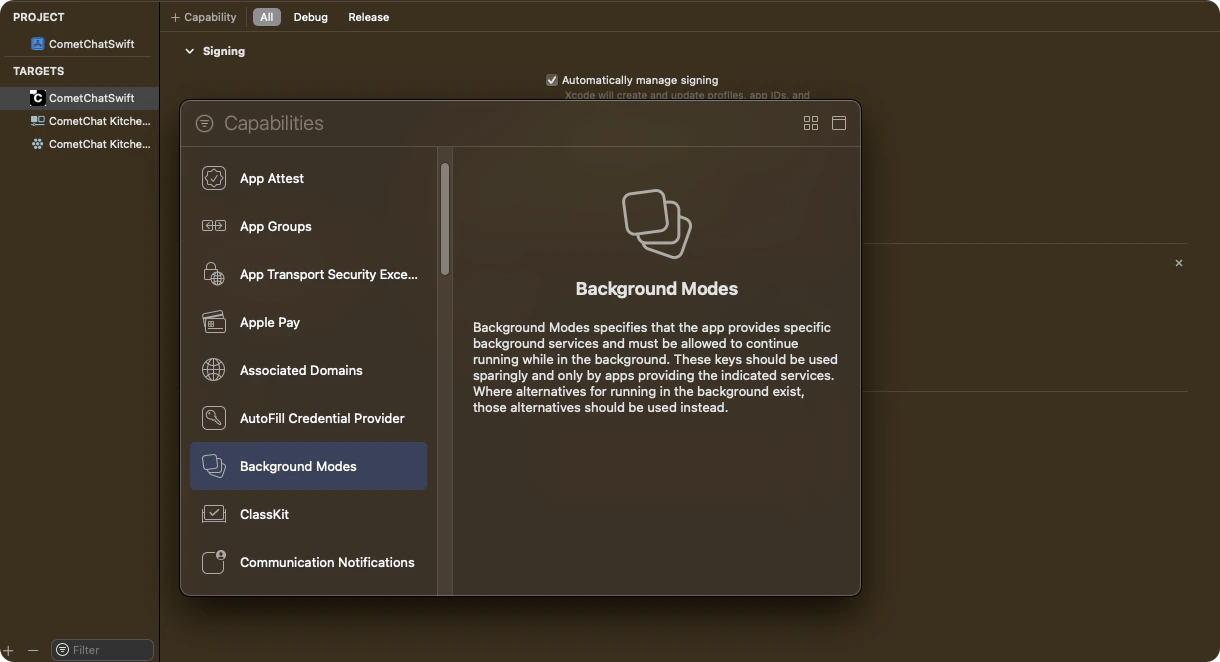
Step 2. Select Background modes for processing
Select ‘Background Fetch’ and ‘Background Processing’ options by ticking them.
Step 3. Add Code in Application class to configure background services for different states.
AddCometChat.configureServices method in application class or scene delegate class as shown below.
- Swift
- As per the iOS standard guidelines, this service will keep alive for few seconds in background services in the system. After few seconds it will get terminated automatically by the system.
- This service is only available after SDK v4.x.x & UI Kit v4.x.x
Step 4. Check background service is running
You can check the background service is running or not usingCometChat.BackgroundTaskEnabled() method. It will return true if service is running else it will return false.
- Swift
Next Steps
Connection Status
Monitor the SDK connection state in real time
Connection Behaviour
Understand default WebSocket connection lifecycle
Managing WebSocket Manually
Take full control of WebSocket connections
Push Notifications
Set up push notifications for your iOS app